What does a Pinterest image saver actually keep?
A good Pinterest image saver keeps the upload itself, and that is what SaverPin is built to do. Every picture on Pinterest exists in several sizes. The tiles you scroll past are trimmed copies, usually around 736 pixels across, while the creator's full file is parked in an originals directory on Pinterest's image servers.
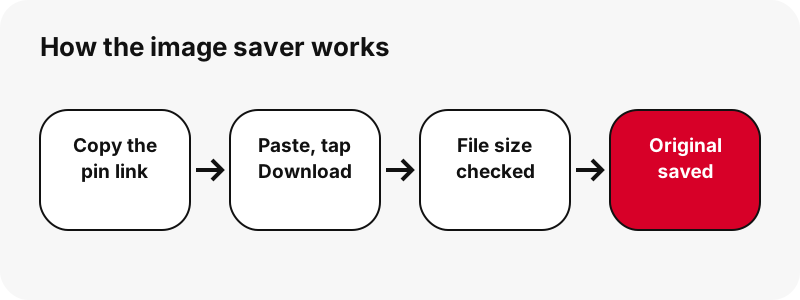
When you paste a pin, SaverPin requests that full file, opens its first bytes to learn the true format and dimensions, and only then offers you a button. On the rare pin where no original is reachable, you are offered the largest size that really exists, labelled honestly.
Your saved photo is never squeezed, resized or branded on the way. What lands on your device is byte for byte the file Pinterest keeps.
Can I save Pinterest images without an account or the app?
Yes. This Pinterest image saver works in any browser, on any device, and never asks you to sign in to Pinterest. It reads the same public data a logged-out visitor would see when opening the pin, so there is no password to share and nothing to install.
Pinterest does have its own menu entry for saving a picture to your device, but it needs you to be signed in, and the help center itself warns that it is not universal:
“Please note that not all Pins can be downloaded so these steps may not apply to all Pins.”
If that menu item is there and you only need a quick copy, use it. Reach for SaverPin when the option is missing, when you are on a borrowed computer, or when you want to know the exact size of the file before it touches your storage.
How much larger is the saved original than the feed copy?
Often close to twice as wide. A grid packed with full uploads would crawl on a phone connection, so Pinterest fills it with light previews and only serves the heavy file on request. A saver that grabs the preview gives you that smaller copy for good.
We checked this on 2026-10-24. One pin that Pinterest described as 736 px wide had an original measuring 1365×1706. A second image pin held a 1080×1521 original that weighed just 160 KB, which shows that full size does not have to mean a heavy file.
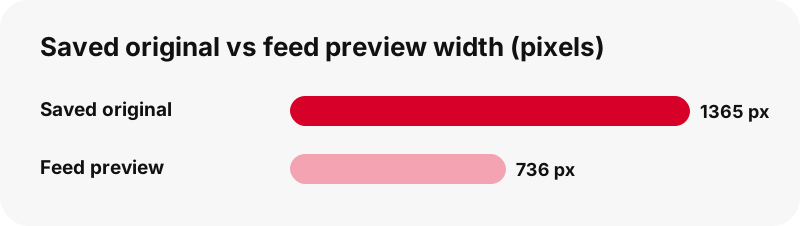
The extra pixels pay off when you print a recipe, zoom into knitting instructions, or crop a single lamp out of a living-room shot. Keep in mind the ceiling is set by the creator: a picture uploaded at 600 px wide can only ever be saved at 600 px, and the button tells you so.
Will my saved Pinterest photo be JPG, PNG or WebP?
It keeps whichever format the person who uploaded it chose. Camera shots are mostly JPG. Text-heavy graphics, logos and cut-out products tend to be PNG. A share of newer uploads are WebP. SaverPin does not convert anything, since turning one format into another either throws away detail or swells the file for no gain.
| Format you receive | Where you usually meet it on Pinterest | Strength |
|---|---|---|
| JPG / JPEG | Recipes, fashion looks, home decor, travel shots | Lossy; keeps photographs light |
| PNG | Printables, quote cards, charts, transparent product shots | Lossless; exact pixels and see-through areas |
| WebP | A portion of recent uploads | Lossy or lossless, supports transparency, usually compact |
| GIF | Moving pins | Saved as .gif on the GIF saver page |
Mozilla's reference explains why the choice matters for what you save:
“It's particularly useful for photographs; applying lossy compression to content requiring sharpness, like diagrams or charts, can produce unsatisfactory results.”
In practice: a meal-planner printable that arrives as PNG should stay PNG, because exporting it to JPG from a phone editor softens the small type. The MDN format guide also covers WebP if you are unsure your apps can open it. Our page on Pinterest save formats lists every file type the site hands out.
How do I save Pinterest photos on an iPhone or iPad?
Use Safari. After you press Download and choose the Image button, Safari stores the picture as a file rather than in Photos. Apple explains that files you fetch from the web go to the Downloads folder in the Files app.
- In Safari, paste the pin link here and tap Download.
- Tap the Image button; accept Safari's download prompt if one appears.
- Tap the small download arrow beside the address field to open the file straight away.
- To move it into Photos, open the file, tap Share, then Save Image.
Safari can keep downloads on iCloud Drive or only on the device; the switch lives in Safari's settings. Step-by-step pictures are in our guides to save Pinterest images on iPhone and on iPad.
How do I save Pinterest photos on Android or a Samsung phone?
Open SaverPin in Chrome, paste, tap Download, then tap Image. Chrome writes the picture to your default download folder, and Google's help confirms you can reach any download from the Files app. Right after saving, Chrome's three-dot menu › Downloads is the fastest shortcut.
Want it in your photo library? Google Photos shows images saved by other apps under Collections › On this device, sorted by folder. Samsung owners can also open the Downloads category inside My Files.
Device walkthroughs: Android, Samsung Galaxy and Xiaomi. If you lose track of a file on any device, see where saved Pinterest files go.
Where do saved Pinterest pictures land on a computer?
In the browser's Downloads folder. The table below gathers the default location and the app that opens the picture on each system, taken from the makers' own support pages.
| Device | Default save location | App that opens it |
|---|---|---|
| Windows PC with Edge | C:\Users\[your name]\Downloads, changeable in Edge download settings | Photos app (JPEG, PNG, GIF) |
| Chrome on Windows, Mac or Linux | The Downloads folder of your user account | Whatever image viewer is set as default |
| Chromebook | Downloads, which ChromeOS can empty when space runs low | Gallery, opened from Files |
| iPhone or iPad | Files › Downloads | Quick Look preview in Files |
Chromebook users should act on that warning: Google describes the Downloads folder as temporary storage, so drag the pictures you want to keep into Google Drive or My files. Guides for each machine: Windows PC, Mac and Chromebook.
Why save the file instead of taking a screenshot?
Because a screenshot records your display, not the photo. Its size depends on your screen, it picks up the clock and battery icons, it loses whatever is scrolled out of view, and it paints any transparent area solid.
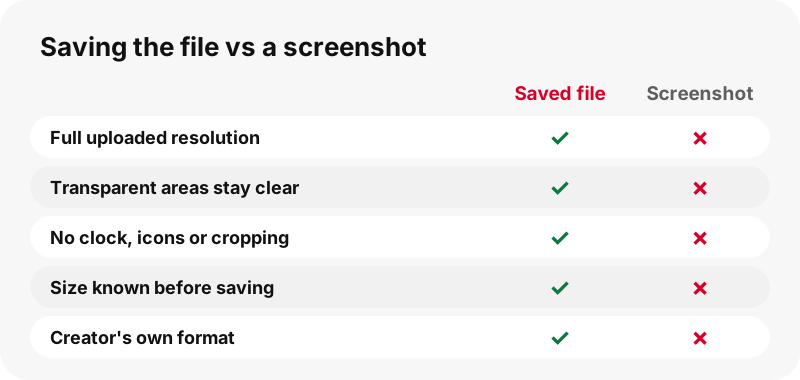
The saved original is the creator's work at full resolution. Compare a 1365×1706 file with a phone capture of that pin shrunk inside the feed and the difference in detail is obvious. A PNG sticker or product cut-out also keeps its clear background, ready to drop onto a new design.
Screenshots remain handy for one job: keeping a quick visual note of how a whole board looks. For each picture you actually want, save the file.
Does the Pinterest image saver handle carousels and idea pins?
It does. A carousel holds several slides, and SaverPin shows every slide as its own row with its own buttons, up to 20 per pin. A picture slide gives you its original image; a video slide gives you an MP4 together with its thumbnail and cover image.
During testing, a 13-slide carousel came back in roughly 1.8 seconds. Its photo slides were 1365×1706 originals weighing between 171 and 263 KB apiece, so saving the whole set barely dents your data plan.
Idea pins built from picture pages behave the same way, one row per page. The result card states how many parts it found, which makes it easy to confirm nothing was skipped. When a slide turns out to be a clip, the Pinterest to MP4 page explains those buttons.
What do the numbers on the save button tell me?
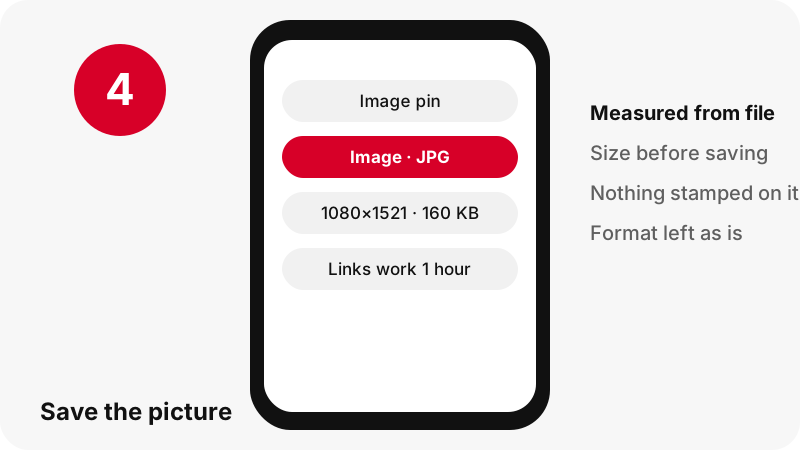
They tell you exactly what you will get before you commit. Each button carries a first line such as "Image · JPG" and a second line such as "1080×1521 · 160 KB", measured from the file itself.
- Low on mobile data? Leave a large picture for later and save it on Wi-Fi.
- Phone storage nearly full? You can see whether the file will squeeze in.
- Planning to print? Check the pixel count covers your paper size first.
- Two similar pins? Save the one whose original is bigger.
If Pinterest's own listing disagrees with the file, the button goes with the file. The figures come from measurement, not from metadata guesses.
Can I save Pinterest images in HD or 4K?
You can save the largest version Pinterest holds, which is whatever the creator uploaded. People searching for an "HD" or "4K" Pinterest image saver often expect a secret high-resolution copy. There is none, and no tool can invent detail that was never in the upload.
SaverPin refuses to upscale or sharpen, and it never stamps an "HD" badge on a stretched file. A 1080×1521 original is labelled 1080×1521. Blowing it up would only make it heavier and softer.
Need something bigger for a poster? Contact the photographer or designer; plenty of them link their own shop or portfolio from the pin. Video works the same way, and our video quality explainer shows why clips top out at 720p.
What happens if the pin I paste is a video, GIF or board?
You still receive the correct file, plus a short note saying what kind of pin it is. The image saver puts picture buttons at the top but shows every other file too.
- Video pin: you get its thumbnail and cover pictures plus the MP4. For saving the clip, start from the Pinterest video saver instead.
- Animated pin: you get the moving .gif and a still JPG frame. The GIF saver is made for these.
- Board address: the tool switches to board mode and lists the pins, just like the board saver.
- Just the preview picture of a video: the thumbnail saver puts it first.
No silent conversions happen: an animation stays .gif and every photo keeps its original format.
Which pin links does the image saver accept?
Public pin addresses and pin.it short links, from any of Pinterest's country sites. A pin copied from pinterest.de, pinterest.ca or pinterest.com.au is treated exactly like one from pinterest.com.
| Link type | Works? | Result |
|---|---|---|
| pinterest.com/pin/1234567890/ | Yes | All files of that pin |
| pin.it/AbCdE short link | Yes | Resolved to its pin or board |
| pinterest.com/name/board/ | Yes | Board mode, 50 pins at most |
| Board section or profile tab | No | An explanation instead of a guess |
| Private pin or secret board | No | Not public, so it cannot be read |
Anything outside this list gets a plain message instead of a broken result. Copied URLs with tracking bits and app share links are covered on the link saver page.
What should I do when a Pinterest picture will not save?
Most failures come down to a non-public pin or a result that has gone stale. Work through this list:
- Open the link in a private or incognito window while signed out. If Pinterest will not show it there, the pin is private or removed.
- Paste the address of the pin itself, not a search result, a profile or a home feed.
- Results expire after an hour; if yours is older, tap Download again.
- On iPhone, check Files › Downloads first, as the picture may already be there.
- On Android, free up some storage and try once more.
For anything else, the not working guide covers rarer cases; nearly all of them apply to photos as much as to videos. Pins that are truly private are explained on the private pins page.
Can I reuse a picture after I save it?
Keeping a picture for yourself and publishing it again are very different acts. Behind most pins is a photographer, illustrator or designer, and the rights normally stay with that person, not with Pinterest and not with whoever re-pinned it.
According to the U.S. Copyright Office, copyright covers original works such as photographs and drawings as soon as they are fixed in a tangible form. Pinterest's copyright policy sets out how rights holders get copies taken down.
A saved wallpaper, a dinner idea or a private inspiration folder carries little risk. A website post, a shop listing or paid client work is different: get permission or link to the original pin. Read more in our legal guide.
Does SaverPin store the pictures I save?
No. Each picture you keep with the Pinterest image saver goes from Pinterest's servers to your device through a signed link that expires after one hour, and SaverPin keeps no copy. An old result therefore cannot be used to fetch files days later.
You do not create an account or connect Pinterest, and there is no app to install. Only public pin data is read. SaverPin is an independent service and has no affiliation with Pinterest.
SaverPin adds no watermark. Any caption, logo or signature on a picture was placed there by its creator.
Which other Pinterest savers can I use here?
All SaverPin tools read the same public pin, but each one puts a different file at the top of the list. Choose the saver that matches what you want to keep.
Frequently asked questions
What is a Pinterest image saver?
A web tool that takes a pin link and gives you the picture as a file. SaverPin returns the creator's original upload rather than the smaller feed preview.
Does SaverPin cost anything?
No. Saving pictures is free and needs no sign-up, and the site has no ads at launch.
Is SaverPin run by Pinterest?
No. It is an independent site with no connection to Pinterest, Inc., and it reads only pins anyone can view while signed out.
Is the saved picture smaller than the original?
No. You get the full upload. In one test, a pin shown at 736 px wide had a 1365×1706 original, and that was the file offered.
Do I have to give my Pinterest password?
Never. Public pins are readable without an account, so SaverPin has no login form.
My saved photo opened as WebP. Is that normal?
Yes. It means the creator's upload is a WebP file, and SaverPin keeps formats unchanged. Current browsers and most phones open WebP; an image editor can export a JPG copy if you need one.
Can I save several photos from one pin?
Yes. Carousels and idea pins list every slide or page separately, up to 20 per pin, each with its own save button.
Can I save a whole board of pictures?
The board saver lists up to 50 pins of a public board so you can save them one at a time. It does not build a ZIP file.
How do I get a saved Pinterest photo into my iPhone Photos app?
Open the picture from Files › Downloads, tap Share, then choose Save Image.
Can SaverPin read a secret board or private pin?
No. Private content is not public, so no outside tool can reach it. Ask the owner to send you the picture.
Will the saver enlarge a small picture?
No. Upscaling adds blur, not detail, so SaverPin gives you the original at its true size and says what that size is.
Why did my save link stop working?
Download links expire one hour after they are created. Tap Download again to get fresh ones.
Is a watermark added to saved pictures?
No. SaverPin adds nothing; any text or logo was already part of the creator's image.
Guides
Video — Paste a pin link and save the video as MP4, up to 720p.
Sources
- Download an image — Pinterest Help Center
- Image file type and format guide — MDN Web Docs (Mozilla)
- Where to find downloads on your iPhone or iPad — Apple Support
- Customize your Safari settings on iPhone — Apple Support
- Download a file (Chrome on Android) — Google Chrome Help
- Find items from other apps & devices — Google Photos Help
- Find where your browser is saving downloads — Microsoft Support
- Copyright in General (FAQ) — U.S. Copyright Office
- Copyright — Pinterest Policy
- Where Are Downloaded Files on a Galaxy Phone? — Samsung