What does a Pinterest video downloader HD give you?
It gives you the biggest video file Pinterest actually stores for that pin, which in our tests is 720p. A good Pinterest video downloader HD should do two things: pick that largest file automatically, and tell you its real resolution before you spend data on it. SaverPin does both.
Each video button carries two numbers read from the file itself: width × height in pixels and the size in megabytes. If a pin only has a 576×1024 version, the button says 576×1024. It is never rounded up to sound better.
Is 720p really HD?
Yes. 720p is the first high-definition format, not a low one. Wikipedia's 720p article defines it like this:
“720p (720 lines progressive) is a progressive HD signal format with 720 horizontal lines/1280 columns”
Full HD is the next step up: the 1080p article describes 1920 × 1080 pixels, often marketed as Full HD to contrast it with 720p. So an HD Pinterest download at 720p is correctly called HD. It is just not Full HD, and we do not call it that.
Why is the HD file vertical, like 720×1280?
Because most Pinterest videos are filmed upright on phones. A vertical 720p frame is 720 pixels wide and 1280 tall, the same pixel count as a 1280×720 TV frame turned on its side. The button prints width first, so a vertical HD file reads 720×1280.
You will also see other upright sizes. In our tests classic video pins came as 720×1280, 576×1024 and 736×1216, and carousel video slides as 720×900. Each is the largest version Pinterest had for that pin. The shape follows the creator's upload, not a choice we make.
How does the downloader pick the largest file?
It lists every MP4 Pinterest has for the pin, reads the real dimensions of each, and puts the biggest one first. For classic video pins Pinterest usually lists one MP4, marked 720p. For idea pins the pin data lists only a streaming playlist, so the tool finds the MP4 matching the playlist's top entry and confirms it exists.
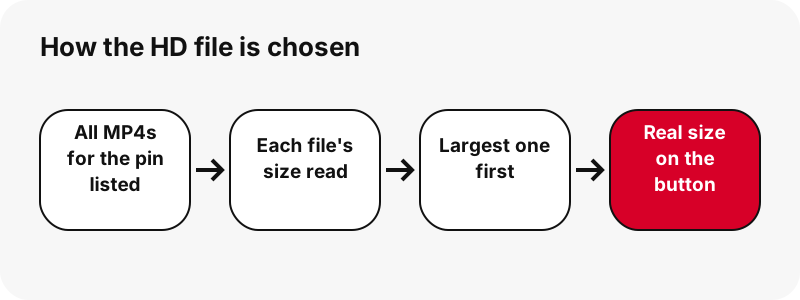
Two smaller H.264 copies, about 486×864 and 360×640, appear under the HD button for idea pins. They are there for mobile data, not as a quality choice.
Can you download Pinterest videos in 1080p?
No, and that is a limit of what Pinterest serves, not of the tool. We tested an idea pin whose source was listed as 1080×1920. Its largest playlist entry was 720×1280, and so was its largest MP4. No 1080p video file existed on Pinterest's servers to fetch.
A search for a Pinterest video downloader 1080p or full HD mostly finds pages that print 1080p in the headline. If the file you receive opens at 720 pixels wide, the label was wrong. Our button tells you the truth first, so there is nothing to discover later.
Is there a Pinterest 4K video downloader?
Not a real one. 4K means a frame of about 3840 × 2160 pixels, and Pinterest does not serve video anywhere near that size. Wikipedia's 4K resolution article lists 3840 × 2160 for digital television and 4096 × 2160 for digital cinema.
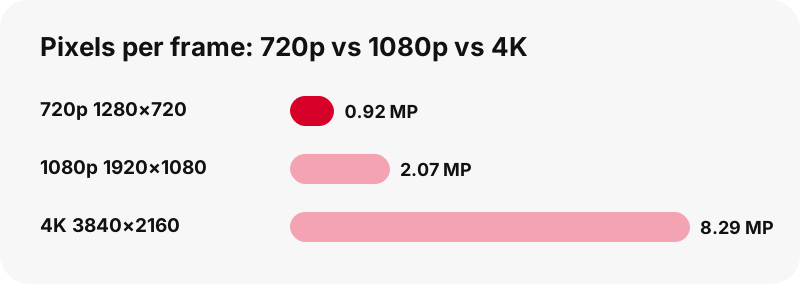
The chart shows the gap: a 4K frame has about nine times the pixels of a 720p frame. A Pinterest video downloader 4K claim would need those pixels to exist in the source. They do not, so the only way to deliver a 4K file is to stretch a 720p one.
What happens when a 720p video is upscaled?
It gets bigger, not sharper. Upscaling uses a video scaler, which Wikipedia describes as a system that converts video from one display resolution to another, typically from lower to higher. The new pixels are guesses made from the old ones.
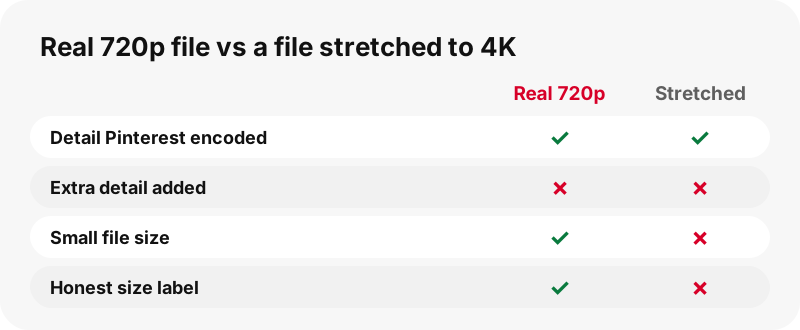
Ordinary scaling only smooths. Newer AI upscalers invent detail that was never filmed, which can look impressive and is still not the original. Either way, the file grows several times while the real information stays at 720p. Your phone or TV already scales on the fly when it plays the video full screen.
How can you check a video's real resolution?
Read the button before you download, then check the file after. SaverPin measures width and height from the MP4 itself and prints them; it does not copy a label from Pinterest's data. After saving, open the file's details in your system and compare.
- The numbers on the button and in the file should match exactly.
- A file that says 4K but opens at 720×1280 was mislabelled somewhere.
- A 4K file that weighs about the same as a 720p one is almost certainly stretched.
- On Mac, Apple notes you can select a file and press Command-I to see its Info window, as described on Apple Support.
More ways to read the numbers are in Pinterest video quality explained.
Why can the thumbnail be sharper than the video?
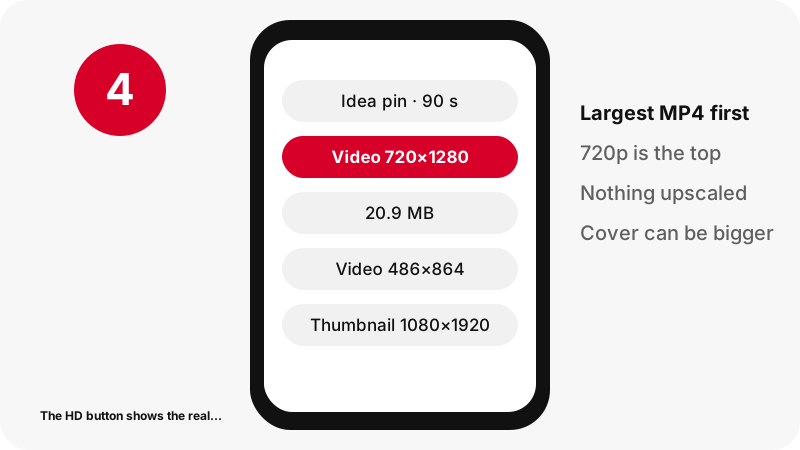
Because Pinterest keeps the cover image at a larger size than the video. In our 90-second idea pin test, the largest MP4 was 720×1280 while the first-frame thumbnail was 1080×1920. That still image is the sharpest picture of the pin you can get.
So if you need a crisp still for a mood board or a blog cover, save the thumbnail rather than grabbing a frame from the video. The thumbnail downloader offers the first frame and the pin's cover as JPG files at full size.
HD sizes measured on real pins
Real numbers beat promises. These are the largest video files the Pinterest video downloader HD found in our tests on 2026-10-24:
| Pin type | Length | Largest MP4 | Size | Also offered |
|---|---|---|---|---|
| Idea pin | 9.5 s | 720×1280 | 2.2 MB | 486×864 (1.3 MB), 360×640 (0.9 MB) |
| Idea pin (source 1080×1920) | 90 s | 720×1280 | 20.9 MB | Thumbnail 1080×1920 |
| Classic video pin | 13 s | 576×1024 | 3.3 MB | Thumbnail and cover JPG |
| Classic video pin | 7 s | 720×1280 | 0.4 MB | Thumbnail and cover JPG |
| Carousel, 13 slides | - | 720×900 per video slide | 370–823 KB each | Picture slides 1365×1706 |
Notice the 13-second pin: its top file was 576×1024, below 720p. When a pin is smaller, the button says so.
Resolution names compared
Here is what each label means and whether Pinterest serves it, so you can read any download page critically.
| Label | Frame (landscape) | Vertical equivalent | Served by Pinterest in our tests |
|---|---|---|---|
| Below HD | - | e.g. 486×864, 360×640 | Yes, as smaller idea pin copies |
| HD 720p | 1280×720 | 720×1280 | Yes, the largest file |
| Full HD 1080p | 1920×1080 | 1080×1920 | No video file; thumbnails only |
| 4K UHD | 3840×2160 | 2160×3840 | No |
If a page offers you a quality menu with 1080p and 4K for a Pinterest link, the extra entries are made up.
Does HD use more data?
A little more than the smaller copies, and the button tells you exactly how much. In our 9.5-second idea pin, HD at 720×1280 was 2.2 MB, against 1.3 MB for 486×864 and 0.9 MB for 360×640. A 90-second idea pin in HD was 20.9 MB.
On a phone screen the middle size looks close to HD, so it is a sensible choice on a tight data plan. Pick HD when you will edit, cast to a TV or watch on a tablet, where the extra pixels show.
Which file is best for TV, editing and phones?
Use the HD 720p file whenever the video will be enlarged or changed. A TV or a projector shows every missing pixel, and an editor re-encodes on export, so start from the best source you have.
- TV or cast: HD file; the TV scales it to fit the screen.
- Editing: HD file, then export once at the end.
- Phone viewing: HD or the 486×864 copy.
- Sharing in a chat: the 360×640 copy is quick to send.
Need the clip as a plain file for any of these? The Pinterest to MP4 page covers formats and playback.
Does HD include sound and no watermark?
Yes. The HD MP4 contains Pinterest's AAC sound track and SaverPin adds no watermark or logo. If a creator burned text or a logo into the picture, that is part of the video and stays.
The no-watermark page explains the difference between an added watermark and content inside the frame. For the sound alone, see Pinterest to MP3, which saves it as M4A.
Where does the HD video save?
It saves to your browser's normal download folder, like any file from the web.
- iPhone, iPad: the Downloads folder in the Files app, per Apple Support.
- Android: Chrome saves to the default download location and Google's help points to the Files app.
- Computers: the Downloads folder.
Use HD downloads fairly
A sharper file is still someone else's work. Keep HD downloads for personal viewing, reference and offline use, and ask the creator before reposting. Pinterest's copyright policy describes how owners can have infringing content removed, and repeat infringers can lose their accounts.
The legal guide goes further. In short: the Pinterest video downloader HD here gives you a clean copy; what you do with it is your responsibility.
Frequently asked questions
What is the highest quality Pinterest video I can download?
In our tests, 720p: usually 720×1280 for vertical videos. Some pins top out lower, such as 576×1024, and the button shows that.
Can a Pinterest video downloader HD give me 1080p?
No. Pinterest did not serve a 1080p video file for any pin we tested, even one with a 1080×1920 source. A 1080p label on a Pinterest download means the file was stretched or mislabelled.
Is there any real Pinterest 4K downloader?
No. Pinterest videos are not stored in 4K, so no tool can fetch a 4K original. A 4K file from a Pinterest link is an upscaled 720p video.
Why do I see three video buttons?
Idea pins offer the HD 720p MP4 plus two smaller H.264 copies, about 486×864 and 360×640, for slower connections. The first button is the largest.
Can I make a Pinterest video sharper after downloading?
An upscaler can enlarge it and smooth edges, and AI tools can invent detail, but neither recovers what was never in the file.
Why is the thumbnail bigger than the video?
Pinterest keeps the cover image at a larger size. In one test the thumbnail was 1080×1920 while the largest MP4 was 720×1280.
Does HD mean a bigger file?
Yes, a little. In one 9.5 s test: 2.2 MB in HD, 1.3 MB and 0.9 MB for the smaller copies. Exact sizes appear on each button.
Does the HD downloader work on iPhone and Android?
Yes. It runs in Safari, Chrome and other modern browsers, with no app and no login. Files go to the normal download folder.
Is the HD video free?
Yes. All sizes are free. There is no premium tier that unlocks a better file, because no better file exists.
Can I download HD video from a private pin?
No. Only public pins can be read, whatever the quality.
Is SaverPin an official Pinterest tool?
No. SaverPin is independent and not affiliated with Pinterest in any way. It works only with public pins.
Guides
Video — Paste a pin link and save the video as MP4, up to 720p.
Sources
- 720p — Wikipedia
- 1080p — Wikipedia
- 4K resolution — Wikipedia
- Video scaler — Wikipedia
- If a media file doesn't open or play on your Apple device — Apple Support
- Finding downloaded files on iPhone and iPad — Apple Support
- Download a file (Chrome for Android) — Google Chrome Help
- Copyright — Pinterest Policy