What does a Pinterest saver actually keep?
A Pinterest saver keeps the real media file of a pin, the same MP4, JPG, PNG or GIF that Pinterest streams to you, as a copy on your own device. That copy opens without the Pinterest app, without a signal and long after you have forgotten which board it sat on.
SaverPin works as a Pinterest saver online, inside any browser. It covers every public format in one place: clips, idea pins, still images, animated GIFs, multi-slide carousels and whole boards of up to 50 pins. You never sign in, and nothing has to be installed first.
The difference from most tools is the label on each button. Before a single byte reaches your phone you can read the pixel dimensions and the exact weight of the file, so a 20 MB clip never surprises you on mobile data.
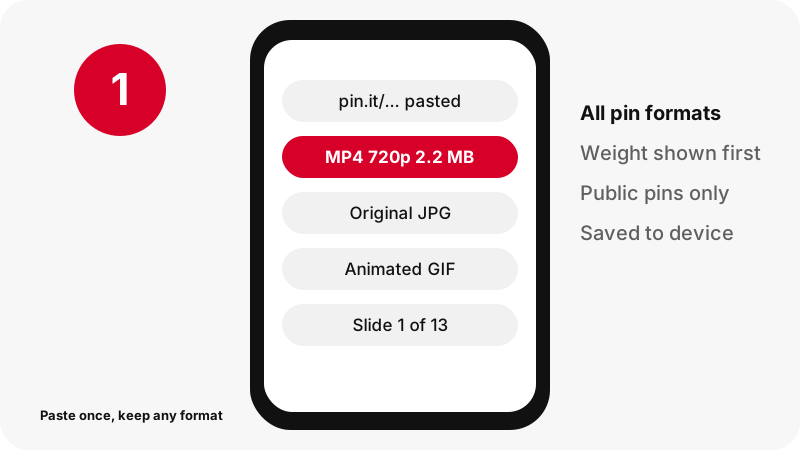
Which pin formats can the Pinterest saver handle?
The saver accepts every public pin format and recognises it on its own. Paste the link and the result card adapts: one MP4 for a clip, an original picture for an image, an animated file for a GIF, one entry per slide for a carousel.
| You paste | You can keep | File type |
|---|---|---|
| A video pin | The 720p clip, its first frame and its cover image | MP4 (H.264 video, AAC sound) and JPG |
| An idea pin | The 720p clip, two smaller versions, first frame and cover | MP4 and JPG |
| A picture pin | The full uploaded original instead of the feed preview | JPG, PNG or WebP, unchanged |
| A GIF pin | The moving original and one still frame | GIF and JPG |
| A carousel | Every slide, up to 20 | MP4 or the original picture, per slide |
| A public board | A list of up to 50 pins, each saved on its own | Whatever each pin holds |
| Only the soundtrack | The audio of a clip, extracted in your browser | .m4a (AAC), never MP3 |
Video and idea pins
Clips are kept as MP4 at up to 720p. Idea pins also come in lighter copies, roughly 486×864 and 360×640, for when space matters. The Pinterest to MP4 page and the idea pin tool go deeper.
Pictures and GIFs
Pictures are kept as the original upload, in the format the creator used. GIFs stay true .gif files with their animation intact. See the image saver page and the GIF page for single-format details.
Sound only
If you only want the music or a voice-over, the saver can copy a clip's AAC track into an .m4a file inside your own browser. It is not converted to MP3. The audio page explains why.
How do I save a pin to my device instead of a board?
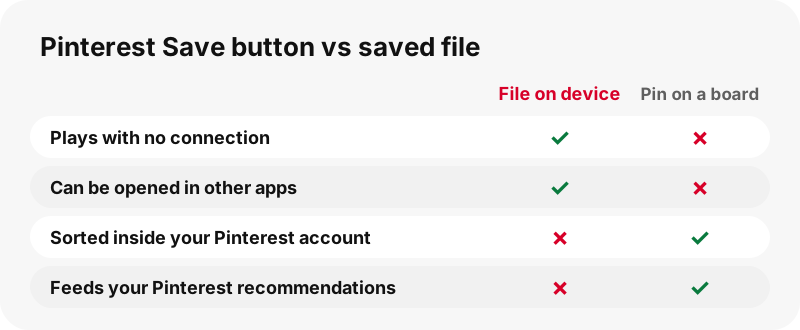
To save a pin to your device, copy its link, paste it into the saver above and tap the file you want. Pinterest's red Save button does something else: it files the pin on one of your boards, inside your account.
“Saving a Pin adds the Pin to one of your boards. This makes it easier to find it later and it helps Pinterest to better understand your taste.”
A board entry is a pointer. If the creator deletes the pin or you lose access, the pointer leads nowhere. A file on your device is a copy you control: you can rename it, trim it, play it on a plane or attach it to a message.
Plenty of people use both. The board keeps their ideas sorted; the saved file keeps the one recipe they will cook tonight, the stretch routine for the gym with weak Wi-Fi, or the sewing pattern for the printer.
Why use a saver when Pinterest has a Download option?
Because Pinterest's own Download option is missing on many pins. It appears in the menu of some images and videos, but the company states that not every pin can be downloaded, and creators decide for their own full-screen clips.
According to Pinterest's guide for creators, a 9:16 video pin is only downloadable if its creator allows it, and the copy it gives carries the creator's username as a watermark. The image download article also warns that some pins have no download option at all.
SaverPin offers a consistent route for any public pin and leaves the file untouched: no logo of ours, no re-encoding. Anything already drawn into the picture by the creator remains. More on that on the no-watermark page.
How much storage will my saved pins use?
A saved pin usually weighs between a few hundred kilobytes and a few megabytes; only long clips climb past 20 MB. The figures below were measured on real pins on 2026-10-24 and describe those pins, not a rule.
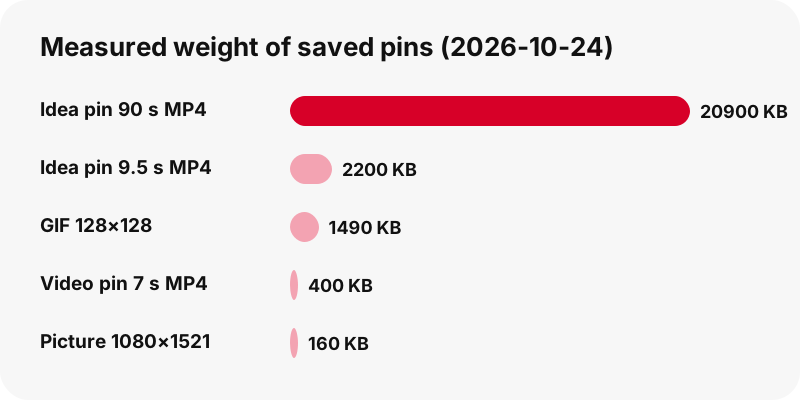
| Pin measured on 2026-10-24 | File kept | Weight |
|---|---|---|
| Classic video pin, 7 s | MP4 720×1280 | 0.4 MB |
| Idea pin, 9.5 s | MP4 720×1280 / 486×864 / 360×640 | 2.2 / 1.3 / 0.9 MB |
| Idea pin, 90 s | MP4 720×1280 | 20.9 MB |
| Carousel, 13 slides | Video slides 720×900 / picture slides 1365×1706 | 370–823 KB / 171–263 KB each |
| Picture pin | Original 1080×1521 | 160 KB |
| Small GIF pin | Animated 128×128 | 1.49 MB |
| Classic video pin, 13 s | Soundtrack only, .m4a | 109 KB |
One surprise: a tiny 128×128 GIF can outweigh a large photo, because GIF compression is old and inefficient. If your phone is nearly full, keep the smaller idea-pin version or just the .m4a sound.
Will a saved pin look worse than on Pinterest?
No. You keep the same file Pinterest serves, so it looks exactly as it does in the app, and pictures often look better, because the saver grabs the upload rather than the shrunken preview.
- Videos: 720p is the highest copy Pinterest stores for these clips, so no button ever claims 1080p or 4K. Even a pin listed as 1080×1920 at the source gave us a 720×1280 MP4.
- Pictures: the feed shows a version 736 pixels wide; one of our test pins had an original of 1365×1706 behind it.
- GIFs: the animation stays a .gif, frame for frame. Pinterest keeps no MP4 copy of GIF pins, so none is offered.
- Sound: the AAC track is copied byte for byte into .m4a, with no quality loss.
For the technical reasons behind the 720p ceiling, read Pinterest video quality explained. The HD page shows how to pick the sharpest available copy.
Where do files from the Pinterest saver land on each device?
Files go to your browser's download location. Pinterest's help notes the same thing for its own downloads: depending on the device and browser, they turn up in Downloads or in Photos.
| Device | Where to look | Device guide |
|---|---|---|
| iPhone | Files app › Downloads | iPhone guide |
| iPad | Files app › Downloads | iPad guide |
| Android phone | Files app › Downloads | Android guide |
| Windows PC | Downloads folder | PC guide |
| Mac | Downloads folder | Mac guide |
| Chromebook | Files › Downloads | Chromebook guide |
Apple's help on downloads confirms the Files location on iPhone and iPad, and items you move into Photos show up under Recently Saved. On Android, Chrome's help points to the default folder.
Want a clip in your camera roll rather than in Files? Follow save a Pinterest video to the gallery. Every device and folder is mapped on where do saved Pinterest files go, and the all-devices hub lists each phone and browser.
How does the saver check a pin before I tap?
It inspects each file before it shows you a button. The public pin record is fetched, every media address in it is collected, the opening bytes of each file are read to confirm its true type and weight, and only files that pass get a button.
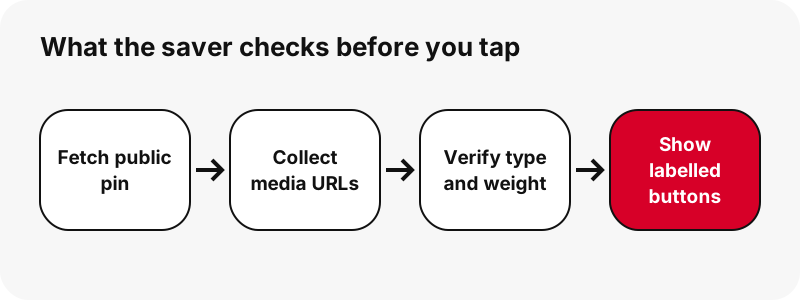
Idea pins take one more step. Their record only names a streaming playlist, so the saver locates the matching 720p MP4 on Pinterest's servers and confirms it answers before listing it. On our local test machine one pin took about 1.1 to 1.5 seconds; a 13-slide carousel took about 1.8 seconds.
Because nothing is transcoded, the weight printed on the button is the weight you find in your Downloads folder.
Can I save a whole board or a carousel at once?
Yes, within limits. A carousel shows every slide, up to 20, each with its own button. A public board link lists up to 50 pins with a thumbnail each, and a "Get all, one by one" option prepares them in sequence.
Each board pin is then treated like a single link, so you still pick the file you want from each. There is no single ZIP archive, secret boards stay closed, and larger boards are only listed up to the first 50 pins. A pin.it link that points at a board switches to board mode by itself.
The board page walks through the full process, and the save formats hub compares what each pin type gives you.
What will the Pinterest saver not do?
It will not open anything that is not public, and it will not invent quality Pinterest never stored. Knowing the limits up front avoids wasted taps.
- It never logs in, so private pins and secret boards are out of reach.
- It cannot deliver 1080p, 2K or 4K video; 720p is the ceiling.
- It does not encode MP3; the sound file is .m4a.
- It cannot turn a GIF pin into an MP4, because Pinterest keeps none.
- It does not package boards as ZIP files or grab a whole profile.
- It does not save captions or subtitles as separate files.
- There is no browser extension, Android APK or desktop program.
A public pin that still refuses to save is covered on download not working. Silent clips are explained on Pinterest video with no sound, and the reasons private pins stay private are on private Pinterest videos.
Do I need to install a Pinterest saver app?
No installation is needed: the saver is a web page, and it works the same in Safari, Chrome, Edge, Firefox or Samsung Internet. Phones, tablets and laptops all use the same box.
If you save pins often, pin the page to your home screen so it opens in one tap, like an app. The app page gives the menu steps for each browser. Treat any download claiming to be a SaverPin APK with suspicion; we have never released one.
What happens to my data when I save a pin?
Very little: the only thing you hand over is the pin link. You never enter a Pinterest password, so your account stays invisible to us, and the files you keep are not stored on our side.
The media travels from Pinterest's servers to you through a signed link that stops working after one hour. Sound extraction runs entirely in your browser and sends nothing back. What the server does log is listed on the privacy page.
SaverPin is an independent service. It is not affiliated with, endorsed by or sponsored by Pinterest, and it adds no watermark to any file.
When is it fine to reuse a pin I saved?
Keeping a pin for your own reference is the everyday use; publishing it again is a different matter. The photographer, illustrator or filmmaker behind a pin holds the rights, so ask before you repost and name them when you do.
“If you’re a copyright owner or authorized to act on behalf of one, you can report alleged copyright infringements on Pinterest by completing a copyright report and sending it to our designated copyright agent.”
Pinterest removes copies that rights holders report under its copyright policy. Whether a reuse counts as fair use depends on factors that the US Copyright Office summarises in its fair use index.
Practical rule: cooking from a saved recipe or studying a saved drawing is personal use; uploading the clip to your own channel is not. Our page on whether downloading Pinterest videos is legal covers the grey areas.
Which SaverPin tool matches one format?
This page is the all-in-one saver. If you already know you only want one kind of file, the tools below open with that format preselected and explain it in more depth. You can also paste any pin link through the link tool or grab just the cover with the thumbnail tool.
Frequently asked questions
What is the best way to save a pin to my device?
Copy the pin's link, paste it into the Pinterest saver at the top of this page, press Download and tap the file you want. It is stored in your browser's download folder.
Is the Pinterest saver online free to use?
Yes. There is no fee, no sign-up and no ads at launch.
Does a saved pin stay on my phone if it is deleted from Pinterest?
Yes. Once the file is on your device it is your copy. Only the download button on our result card expires, one hour after it is created.
Can I keep idea pins and carousels, not just videos?
Yes. Idea pins give a 720p MP4 plus lighter copies, and carousels list each slide, up to 20, as a separate file.
Will the saved video have sound?
If the original clip has a soundtrack, the MP4 keeps it. You can also keep only the sound as an .m4a file.
Why is the maximum video quality 720p?
Because 720p is the highest copy Pinterest stores for these clips. The saver never upscales and never labels a file 1080p or 4K.
Do saved images keep their original size?
Yes. The saver takes the uploaded original, not the 736-pixel feed preview, and keeps its format, so a PNG stays a PNG.
Can I save Pinterest pins on a computer?
Yes. The saver works in any desktop browser on Windows, macOS, Linux or ChromeOS, and files go to the Downloads folder.
Does the saver work with pin.it short links?
Yes. Short pin.it links are resolved automatically, and a pin.it link to a board opens board mode.
How many pins from one board can I save?
Up to 50 pins from a public board are listed. Each is prepared one by one; there is no ZIP file.
Do I have to log in to Pinterest?
No. The saver only reads public pins and never asks for your Pinterest account.
Is there a watermark on files from SaverPin?
No watermark is added. Text or logos the creator placed inside the picture itself stay as they are.
Is SaverPin run by Pinterest?
No. SaverPin is an independent tool and has no link to Pinterest beyond reading public pins.
Guides
Video — Paste a pin link and save the video as MP4, up to 720p.
Sources
- Download an image — Pinterest Help Center
- Create a Pin from an image or video — Pinterest Help Center
- Copyright — Pinterest Policy
- U.S. Copyright Office Fair Use Index — U.S. Copyright Office
- Find your downloads on iPhone or iPad — Apple Support
- Find recently saved photos and videos on iPhone — Apple Support
- Download a file (Chrome on Android) — Google Chrome Help