Why is my Pinterest video download not working?
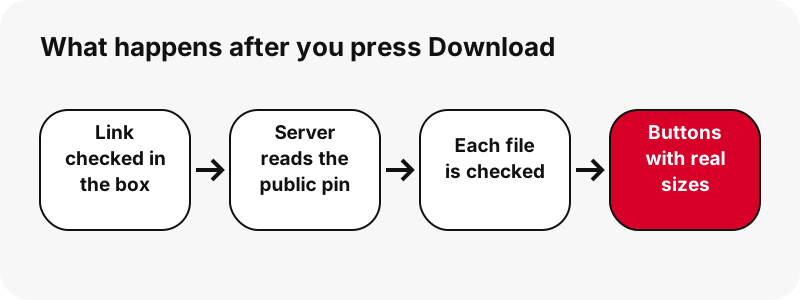
Most of the time it is one of five things: the link is not a pin link, the pin is private or deleted, the download link has expired, Pinterest did not answer in time, or the pin is not a video at all. Each one has its own message in SaverPin, so you never have to guess.
- Wrong kind of link (a search page, a profile, a board section, an image address).
- Private, deleted or incomplete pin: the server cannot see it.
- Expired download link: links last 1 hour.
- Pinterest or your connection is slow: try again in a moment.
- The pin is a picture or a GIF: you get that file instead of an MP4.
The table in the next section lists every message the tool can show, word for word, as it appears on the page. The sections after it explain the ones people meet most often. If your pinterest video download not working problem is about sound or the gallery instead, jump to no sound or save to gallery.
What does each error message mean?
Every message below is copied from the tool's own code, so it is exactly what you will read under the box. The right-hand column is the fix.
| Message you see | What it means | Fix |
|---|---|---|
| Paste a Pinterest link first. | The box was empty when you pressed Download. | Copy the pin link in Pinterest and paste it. |
| That is not a Pinterest pin link. Use a link like pinterest.com/pin/123… or pin.it/… | The text is not a pin, a pin.it link or a public board. | Open the pin itself, tap Share › Copy link. |
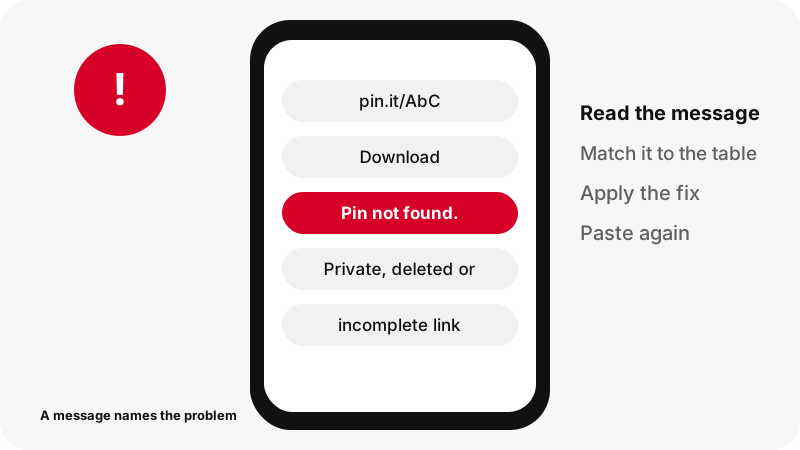
| Pin not found. It may be private, deleted, or the link is incomplete. | Pinterest did not return a public pin for that address. | Check the pin opens when logged out; recopy the full link. |
| This pin has no video or image we can save. | The pin exists but has no file the tool can check. | Open the pin in Pinterest to see what it holds. |
| Pinterest did not answer. Try again in a moment. | Pinterest's servers did not reply in time. | Wait a few seconds and press Download again. |
| Connection problem. Check your internet and try again. | Your device could not reach SaverPin. | Check Wi-Fi or mobile data, then retry. |
| Too many requests. Wait a minute and try again. | Too many requests in a short time. | Wait about a minute. |
| This board has no public pins we can list. | The board is empty, private or unreadable. | Check the board is public; try a single pin link. |
| Link expired. Paste the Pinterest link again. | The download link is older than 1 hour. | Paste the pin link again for fresh buttons. |
| Could not cut the audio from this file. Try the MP4 instead. | The audio step failed on your device. | Download the MP4; the sound is inside it. |
Two more lines are notes, not errors: "This pin is a picture, not a video. Here is the original image." and "This pin is a GIF, not a video. Pinterest keeps it as a .gif file." They mean the tool worked and found a different file type.
"That is not a Pinterest pin link": which links work?
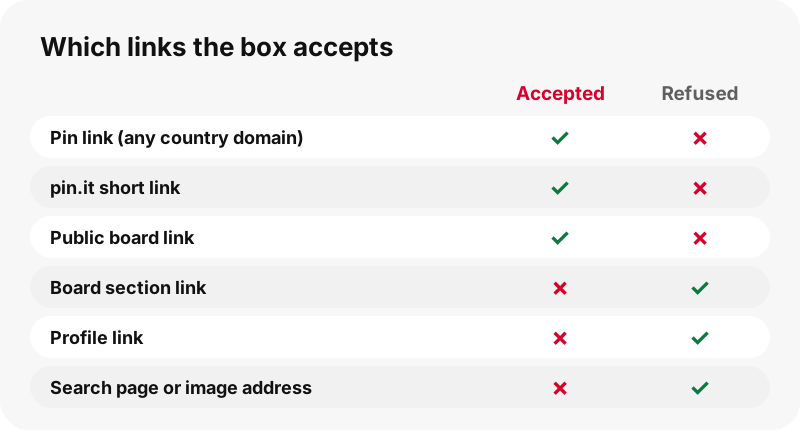
Pin links, pin.it short links and public board links work; almost everything else is refused on purpose. The box checks the text before anything is sent, so a wrong link is caught in a fraction of a second.
| Link you paste | Works? | What happens |
|---|---|---|
| pinterest.com/pin/1234567890/ | Yes | Read as a single pin |
| pinterest.co.uk/pin/… (any country domain) | Yes | Read as a single pin |
| pin.it/AbC123 | Yes | Followed to the pin, or to a board |
| pinterest.com/name/board-name/ | Yes | Board mode: up to 50 pins |
| pinterest.com/name/board-name/section/ | No | Board sections are not supported |
| pinterest.com/name/ (a profile) | No | Profiles are not supported |
| pinterest.com/search/pins/?q=… | No | Search pages are not pins |
| i.pinimg.com/…/photo.jpg (file address) | No | Paste the pin link instead |
Copying from the Pinterest app often gives text like "Check out this Pin… https://pin.it/…". That is fine: the box keeps the first web address in what you paste and drops the rest. If a pin.it link is cut short (fewer than three characters after the slash), it is refused.
Not sure where the link is? The link downloader page shows where Share › Copy link sits in the app and on the website.
"Pin not found": private, deleted or incomplete?
"Pin not found" means Pinterest did not give the server a public pin for that address. There are three usual reasons, and you can tell them apart in under a minute.
- Private board. Log out of Pinterest (or open a private browser window) and open the pin link. If you cannot see it, it is not public.
- Deleted pin. If Pinterest itself shows an error for the link, the pin is gone.
- Incomplete link. Compare the pasted number with the pin's address. A link missing digits points to nothing.
Pinterest's help page on private boards explains the first case in one sentence:
“Only you (and anyone you invite) can see your private boards.”
SaverPin never logs in to Pinterest, so a private pin stays private: no tool without the owner's account can read it, and none should. If the pin is yours, make the board public for a moment, or download it from your own Pinterest account. The private pins page covers the honest options.
"Link expired": why do download links stop working?
Every download button is a signed link that works for 1 hour, then stops on purpose. After that, opening it gives the plain text "Link expired. Paste the Pinterest link again." with an HTTP 410 status.
MDN, Mozilla's web documentation, defines that status code:
“The HTTP 410 Gone client error response status code indicates that the target resource is no longer available at the origin server and that this condition is likely to be permanent.”
In our case "permanent" applies to that one link, not to the pin. Paste the pin link again and you get fresh buttons that work for another hour. This short life keeps the download service from being used as an open file proxy, and it means nothing stays reachable after you leave.
This often happens when a tab sits open overnight, or when someone shares a download button's address instead of the pin link. Share the pin link; the download link is only for you, for an hour.
"Pinterest did not answer" or "Too many requests"
Both mean "wait and try again", but for different reasons. "Pinterest did not answer" appears when Pinterest's servers do not reply to ours in time, or reply with an error. "Too many requests" appears when too many requests arrive in a short time.
MDN describes the second case as rate limiting:
“The HTTP 429 Too Many Requests client error response status code indicates the client has sent too many requests in a given amount of time.”
- Wait a minute before pressing Download again; repeated taps make it worse.
- On a board, use Get all, one by one: it prepares pins in sequence, not all at once.
- "Connection problem" is different: it means your own device could not reach SaverPin. Check Wi-Fi or mobile data.
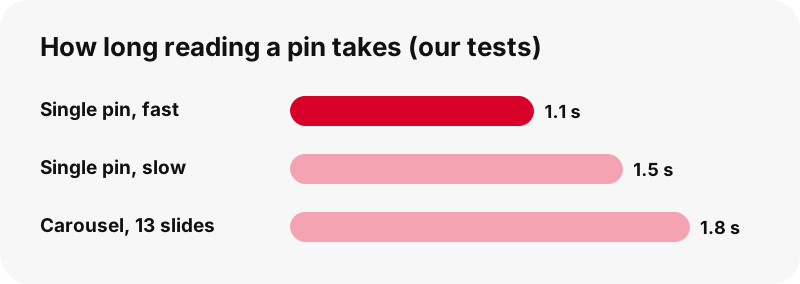
In our tests a single pin is read in about 1.1 to 1.5 seconds, and a 13-slide carousel in about 1.8 seconds. If the message "Reading the pin…" stays much longer than that, refresh the page and paste again.
"This pin is a picture" or "a GIF": not every pin is a video
The tool did work: the pin simply is not a video, so you get the file it really has. Some pins that move in the feed are GIFs, not videos, and the card tells you which kind you have.
- "This pin is a picture, not a video. Here is the original image." You get the original upload (JPG, PNG or WebP), not the 736-pixel preview.
- "This pin is a GIF, not a video. Pinterest keeps it as a .gif file." You get the original animated GIF and a still JPG. Pinterest stores no MP4 copy of GIF pins, so no tool can give you one from Pinterest.
- On the audio page, "This pin is not a video, so it has no sound to save." means the same thing.
For those pins, the GIF downloader and the image downloader put the right button first. In our tests a GIF pin of 396×223 was 494 KB, and a 128×128 GIF was 1.49 MB, so GIF size depends on length more than on pixels.
The download finished, but I cannot find the file
If the button worked, the file is in your browser's download folder, even if your gallery does not show it yet. This is the most common "not working" report that is not an error at all.
| Device | Look here first | Source |
|---|---|---|
| iPhone / iPad | Files › Downloads, or the Downloads button next to the Safari search field | Apple |
| Android (Chrome) | Chrome › More › Downloads, or the Files app | |
| Windows / Mac / Linux (Chrome) | More › Downloads; default folder is Downloads |
The where do downloads go hub covers more devices, including Samsung and Xiaomi. If the file is there but plays with no sound, read why a Pinterest video has no sound.
Why can't I get 1080p, a whole board, or a private video?
Because those things do not exist on Pinterest's public side, and SaverPin will not pretend otherwise. These are limits, not bugs, and no message can fix them.
- 1080p or 4K: the largest MP4 Pinterest stores is 720p in our tests, even for a 1080×1920 upload. The button shows the real size.
- More than 50 pins of a board: board mode lists up to 50 pins of a public board.
- A ZIP of a board: not offered; pins are saved one by one.
- Private pins and private boards: not readable without the owner's login.
- MP3: the audio button makes an M4A file with the original sound, not an MP3.
If you saw a tool promise any of these, test it against a pin you know. The quality explainer shows what Pinterest really stores for each pin type.
Still not working? What to send us
Send us the pin link and the exact message, and we will look at that pin. Use the contact page and include:
- The pin link you pasted (not the download button's address).
- The message under the box, word for word.
- Your device and browser, for example "Android, Chrome" or "iPhone, Safari".
- Whether the pin opens in Pinterest when you are logged out.
Please do not send screenshots of private pins: we cannot open them either. For general use of the tool, the Pinterest video downloader home page explains every button.
SaverPin is independent and not affiliated with Pinterest. It reads public pins only. Respect the creator's rights when you save or share their work.
Frequently asked questions
Why does SaverPin say "Pin not found"?
Pinterest did not return a public pin for that link. The pin may be on a private board, deleted, or the link may be missing characters. Open it while logged out to check.
Why does it say my link is not a Pinterest pin link?
The box accepts pin links, pin.it links and public board links only. Profiles, board sections, search pages and image file addresses are refused.
What does "Link expired" mean?
Download links work for 1 hour. After that, paste the pin link again to get new buttons.
Why does it say "Pinterest did not answer"?
Pinterest's servers did not reply to ours in time. Wait a few seconds and try again.
Can a pin.it link fail?
Yes, if it is cut short or points to a pin that no longer exists. A complete pin.it link to a public pin or board works.
Why did I get a picture instead of a video?
Because the pin is a picture. The tool says so and gives you the original image instead of an MP4.
Why is there no MP4 for my GIF pin?
Pinterest stores GIF pins as .gif files only; there is no MP4 copy to download.
Why can I not download a private Pinterest video?
Private boards are visible only to the owner and invited people. SaverPin never logs in, so it cannot read them.
Why does the video have no sound?
Some videos are uploaded without a sound track. On the audio page the tool tells you before you save. See our no-sound guide for the other causes.
Is SaverPin part of Pinterest?
No. SaverPin is an independent tool and is not affiliated with Pinterest. It only reads public pins.
The download finished but I cannot find it. Where is it?
In your browser's download folder: Files › Downloads on iPhone, Chrome › More › Downloads or the Files app on Android, the Downloads folder on a computer.
Does SaverPin work on every browser?
It runs in modern browsers on phones and computers. If the Paste button does nothing, long-press the box and paste by hand.
Guides
Video — Paste a pin link and save the video as MP4, up to 720p.
Sources
- Private boards — Pinterest Help Center
- 410 Gone — MDN Web Docs
- 429 Too Many Requests — MDN Web Docs
- Find downloaded files on iPhone or iPad — Apple
- Download a file in Chrome (Android) — Google
- Download a file in Chrome (computer) — Google
- MP4 file format — Wikipedia
- Copyright — Pinterest