Why does my Pinterest video have no sound?
There are only three real causes: the video was uploaded without a sound track, your device or player is muted, or the pin is not a video (a GIF or a picture). SaverPin can tell the first and third apart from the second before you save anything.
- No sound track in the file. Some creators upload silent clips. Then every copy is silent, on Pinterest and off it.
- Muted device or player. The file has sound, but the phone's media volume is down or the player is muted.
- Not a video. GIF pins and picture pins have no MP4, so there is no sound to play or save.
What is not a cause: SaverPin never removes audio. The MP4 you get is the file Pinterest serves, streamed through our download link without re-encoding. If the source has a sound track, your copy has it too.
The quickest test is the box above, set to audio mode. The next section shows what the card says in each case.
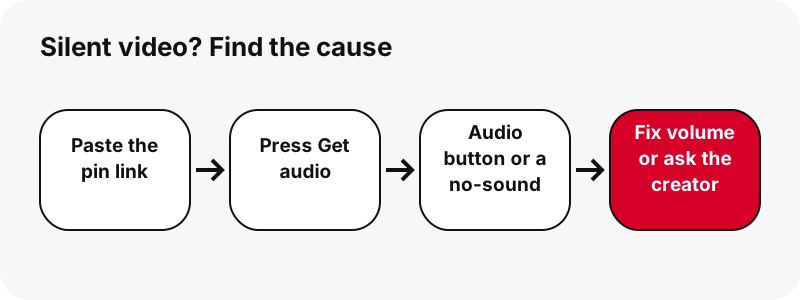
Pinterest video no sound: does the pin have a sound track at all?
SaverPin answers this for you, because it reads each MP4's track list before showing the buttons. An MP4 file starts with a header that lists its tracks; if one of them is a sound track, the card adds an Audio · M4A button with an estimated size.
| What the card shows | What it means | What to do |
|---|---|---|
| Audio · M4A button with "≈ 80 KB" (or similar) | The MP4 has a sound track | Check your volume; save the MP4 or the M4A |
| "This video has no sound track, so there is no audio to save." | The file is silent at the source | No tool can add the sound; ask the creator |
| "This pin is not a video, so it has no sound to save." | It is a picture or a GIF | Save the image or GIF instead |
| "Could not cut the audio from this file. Try the MP4 instead." | The audio step failed on your device | Download the MP4; its sound is intact |
This check runs on Pinterest's own file, not on a copy, so the answer is about the pin itself. If the card says there is no sound track, the file Pinterest serves for that pin is silent.
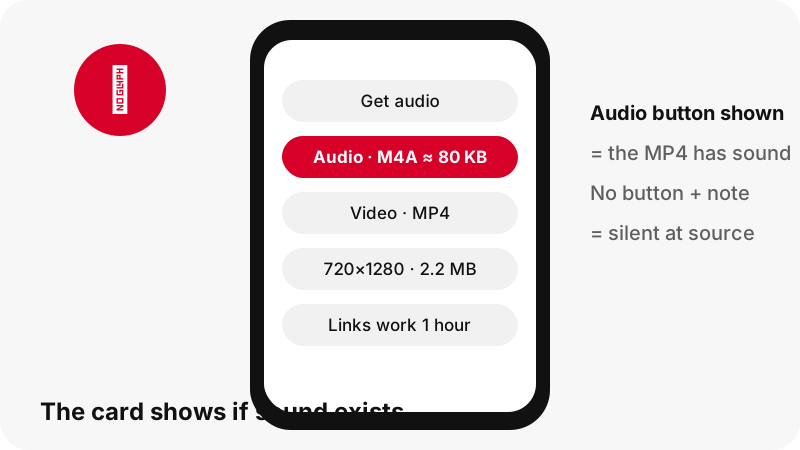
Why did the video seem silent on Pinterest?
Often because it started muted. Browsers block videos with sound from playing on their own, and MDN, Mozilla's web documentation, explains the exception that sites rely on:
“Autoplay blocking is not applied to <video> elements when the source media does not have an audio track, or if the audio track is muted.”
MDN adds that a page which needs to autoplay a video can mute it, or supply a video with no audio track. So a clip that plays silently in a feed may have full sound that is simply switched off until you turn it on.
That gives you a simple test: open the pin on Pinterest and look for its sound control. If turning it on gives you sound, the file has a sound track, and your download will too. If SaverPin says "This video has no sound track", there is nothing to turn on.
Pinterest video no sound on your phone? Check the volume
If the card showed an Audio button, the sound is in your file; the problem is volume or the player. Phones keep separate volumes for media and for ringtones, and that catches many people.
Apple's iPhone guide spells it out:
“Note: The volume buttons control media volume while audio is playing; when no audio is playing, the volume buttons control ringer and alert volume.”
- Start the video first, then press volume up. On iPhone that changes media volume only while sound is playing.
- On iPhone you can also open Control Center and drag the volume control, as Apple's guide describes.
- On Android, Google notes that the volume a button changes "depends on what you're doing"; press it while the video plays.
- If headphones or a Bluetooth speaker are paired, Android's Media volume screen has a Play media to option; check where the sound is going.
- Check the player's own mute button.
Google's page is Change volume, sound and vibration on Android; Apple's is Adjust the volume on iPhone.
Can my player play the sound? MP4, AAC and M4A explained
Almost certainly yes. Pinterest videos use H.264 video with AAC sound inside an MP4 file, one of the most widely supported combinations.
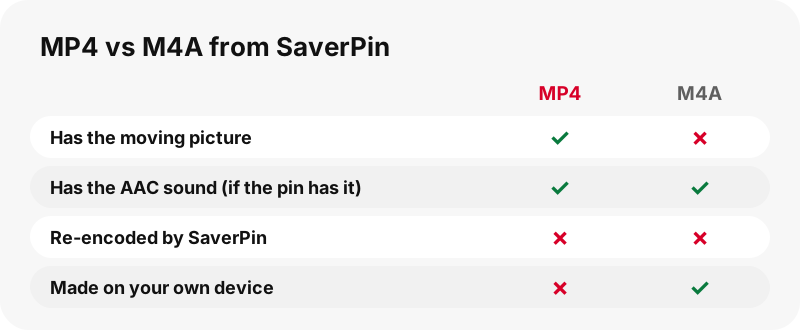
Wikipedia describes AAC as the successor to MP3 and notes where it usually lives:
“AAC encoded audio files are typically packaged in an MP4 container most commonly using the filename extension .m4a.”
| Device / app | MP4 (H.264 + AAC) | M4A (audio only) | Source |
|---|---|---|---|
| Windows Media Player | MPEG-4 (H.264) listed | AAC and M4A listed | Microsoft |
| Chromebook | mp4 / H264 in the codec table | .m4a in the media list | |
| Mac, QuickTime Player | Opens video files | Opens audio files | Apple |
| Microsoft Edge (our test) | Not part of this test | Plays, correct duration | Tested 2026-10-24 |
One caveat for Windows: an older Microsoft article says Windows Media Player does not play .mp4 without extra decoders, while the newer troubleshooting page lists MPEG-4 (H.264) as supported. If an old player shows a picture but no sound, try the Microsoft Photos app or your browser.
Do the smaller MP4 copies have sound?
Pick the largest MP4 when sound matters. The Audio button and its size estimate are read from the main MP4, the largest one on the card. For idea pins, the card also lists two smaller copies (about 486×864 and 360×640) from the same set of files Pinterest stores.
We have not checked every smaller copy of every idea pin for a sound track, so we will not promise one. If a smaller copy plays silently, download the largest MP4 instead; it is the file the sound check was run on.
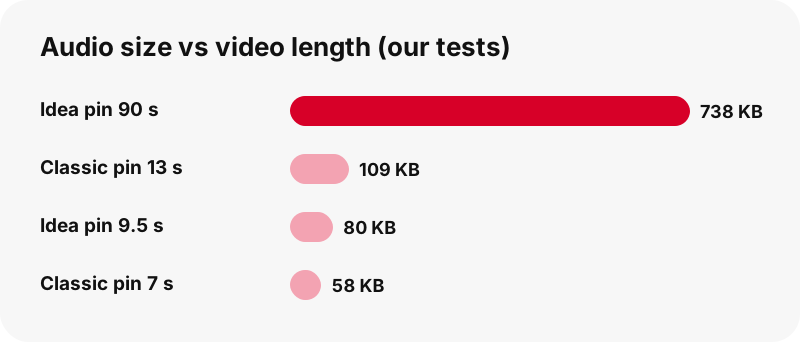
| Pin (our test) | Largest MP4 | Audio M4A |
|---|---|---|
| Idea pin, 9.5 s | 720×1280, 2.2 MB | 80 KB |
| Idea pin, 90 s | 720×1280, 20.9 MB | ≈ 738 KB |
| Classic video pin, 13 s | 576×1024, 3.3 MB | 109 KB |
| Classic video pin, 7 s | 720×1280, 0.4 MB | 58 KB |
The audio is tiny next to the video: about 3 to 4 % of the file in the idea pins above. That is normal for AAC speech or music at phone quality.
How do I save only the sound of a Pinterest video?
Press Get audio, then tap Audio · M4A. Your own browser downloads the MP4, copies the AAC sound track out of it byte for byte, and saves an .m4a file. Nothing is uploaded and nothing is re-encoded, so the sound is exactly as good as in the video.
- While it works, the box says "Cutting the sound out of the video on your device…" with a progress bar.
- When it is done: "Audio saved (80 KB, M4A).", with your file's real size.
- It is an .m4a file, not an MP3. We say this plainly because many pages promise MP3 and do not deliver it.
The MP4 format is a container for video, audio and text, which is why the sound can be lifted out cleanly. The Pinterest to MP3 page covers the audio tool in depth, including which apps open M4A files.
GIF pins and picture pins never have sound
A GIF pin has no sound to save, because Pinterest stores it only as a .gif file with no MP4 copy. SaverPin does not offer audio for GIF pins: there is no video track to take it from.
If you paste a GIF or picture pin on this page, the card says "This pin is not a video, so it has no sound to save." and offers the file the pin does have. The GIF downloader gives you the original animated GIF plus a still JPG; the image downloader gives you the original upload.
In our tests a 396×223 GIF pin was 494 KB, while a 7-second classic video pin was 0.4 MB with sound. Size alone will not tell you which is which; the badge on the result card (Video pin, GIF pin, Image pin, Idea pin, Carousel) will.
The video is silent at the source: what now?
Then no downloader can add sound, and any that claims to is not being straight with you. The only real fix is to ask the creator whether they have a version with sound.
- Message the creator on Pinterest and ask for the original clip.
- If the sound you want is a song, find the song itself from its official source rather than ripping it.
- If you plan to reuse the clip with your own music, ask the creator first; it is their work.
Pinterest's copyright policy describes how rights owners report infringing content. Saving for your own viewing is one thing; reposting is another. The is it legal page covers the main questions with official sources.
SaverPin is independent and not affiliated with Pinterest. It reads public pins only and never asks for a login.
Other problems with Pinterest downloads
Solved your Pinterest video no sound problem, or is it something else? If your issue is not sound, one of these pages has it. Each one is written for one problem, with the tool's real messages.
- Pinterest video download not working: every error message and its fix.
- Save a Pinterest video to your gallery: where the file lands on each phone.
- Pinterest video quality explained: why 720p is the top.
- Where do Pinterest downloads go: folders on every device.
Frequently asked questions
Why does my downloaded Pinterest video have no sound?
Either the video was uploaded without a sound track, or your device or player is muted. Paste the link on this page and press Get audio: the card tells you which.
Does SaverPin remove the sound?
No. The MP4 is the file Pinterest serves, streamed without re-encoding. If the source has sound, your copy has it.
How do I know if a pin has sound before downloading?
Paste the link and press Get audio. An Audio · M4A button with a size means there is a sound track; a note saying the video has no sound track means it is silent.
The video had sound on Pinterest but not in my download. Why?
Check that you picked the largest MP4 and that your media volume is up while the video plays. The sound check is run on the largest MP4.
Why did the video look silent in the Pinterest feed?
Browsers block autoplay with sound, so videos that start by themselves are often muted. Turn on the pin's sound to check.
Can SaverPin add sound to a silent video?
No tool can. If the file has no sound track, ask the creator for a version with sound.
Do GIF pins have sound?
No. Pinterest stores GIF pins as .gif files with no MP4 copy, so there is no sound to save.
Can I save just the audio?
Yes, as an M4A file. Your browser copies the original AAC track out of the MP4, with no re-encoding and nothing uploaded.
Is the audio an MP3?
No, it is M4A (AAC sound). It is not converted to MP3, so there is no quality loss.
What does "Could not cut the audio from this file" mean?
The audio step failed in your browser. Download the MP4 instead; the sound is inside it.
Is SaverPin part of Pinterest?
No. SaverPin is an independent tool and is not affiliated with Pinterest. It only reads public pins.
Which app plays the sound on Windows?
Microsoft's troubleshooting page lists AAC, M4A and MPEG-4 (H.264) for Windows Media Player. A browser such as Microsoft Edge also plays the M4A; we tested it.
Guides
MP3 / Audio — Cut the sound from a video pin as an M4A file on your device.
Sources
- Autoplay guide for media and Web Audio APIs — MDN Web Docs
- Advanced Audio Coding — Wikipedia
- MP4 file format — Wikipedia
- Adjust the volume on iPhone — Apple
- Change volume, sound and vibration on Android — Google
- Troubleshoot Windows Media Player errors — Microsoft
- File types supported on Chromebooks — Google
- Open a video or audio file in QuickTime Player on Mac — Apple
- Copyright — Pinterest