What is different about saving Pinterest videos on a Mac?
Mostly the destination: a Mac puts the file in a real folder you can see in the Finder, rename, drag into an editor or back up. Phones hide that step behind apps; the Mac does not.
The method behind how to download Pinterest videos on Mac is short. You copy the pin address, paste it into SaverPin, and click a button that shows the real pixel size and file size first. Safari and Chrome both work, and neither needs an extension.
- You get: the MP4 Pinterest stores (H.264 video, AAC sound), up to 720p.
- You can also get: the cover frame as JPG, picture pins in their original size, GIFs as .gif and the sound as M4A.
- You do not need: a Pinterest account, an app from the Mac App Store, or a browser add-on.
Working on Windows too? The PC guide covers Edge and File Explorer.
How do you save a Pinterest video with Safari on Mac?
Click the MP4 button on the result card and Safari downloads it. If Safari decides to play the clip in a new tab instead, use the fallback in Apple's Safari download guide: Control-click the link and choose Download Linked File.
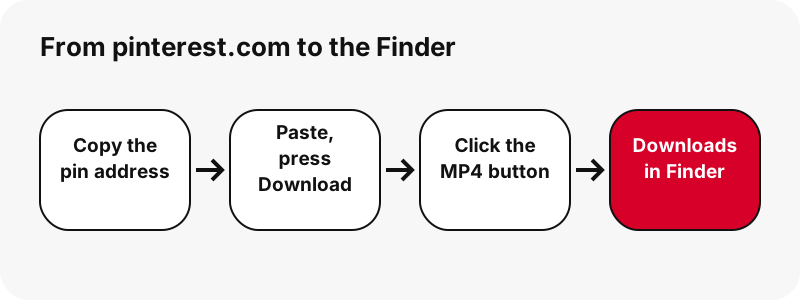
- Copy the pin's address from pinterest.com.
- Paste it into the box on this page and press Download.
- Click the MP4 button, or Control-click it and choose Download Linked File.
- Click the downloads button near the top-right corner of the Safari window to see the file.
Where does Safari put it?
In the folder chosen in Safari › Settings › General, under “File download location”. In the downloads list, the small button next to a file's name shows it in the Finder; Apple notes that Safari can't find a file you have moved since.
Why did the file vanish from Safari's downloads list?
Because Safari tidies the list, not the folder. The MP4 is still in Downloads; only the entry in Safari's list is gone. Apple documents two habits that surprise people who save many pins.
“By default, Safari automatically removes an item after one day.”
Downloading the same pin twice
Apple also says that if you download an item you downloaded before, Safari removes the older duplicate. Handy for storage, but rename a copy first if you were keeping an edited version under the original name.
Both settings live in Safari › Settings › General: “Remove download list items” sets when entries disappear, and “File download location” sets the folder.
How do you download Pinterest videos with Chrome on Mac?
The same way: click the MP4 button and Chrome saves it. According to Google's Chrome download help, the default folder on a Mac is /Users/<username>/Downloads, and a download icon appears at the top right next to the address bar while the file comes in.
To use another folder, open Chrome Settings, then Downloads, and click Change. Google adds that clicking a finished download opens it in your computer's default app for that file type.
| Safari on Mac | Chrome on Mac | |
|---|---|---|
| Default folder | Set in Safari › Settings › General | /Users/<username>/Downloads |
| See downloads | Button near the top-right of the window | Icon next to the address bar |
| Change folder | “File download location” pop-up menu | Settings › Downloads › Change |
| List cleanup | Entries removed after one day by default | Not covered by the cited page |
Which app plays the MP4 on a Mac?
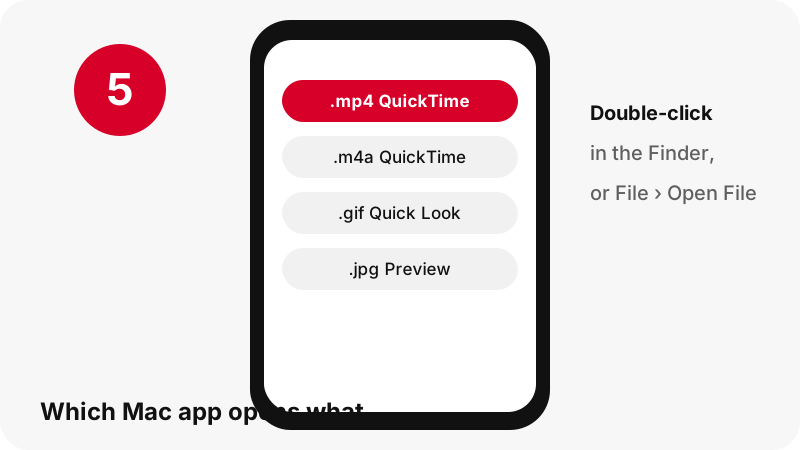
QuickTime Player, which comes with macOS. Apple's QuickTime Player guide lists the ways to open a clip: double-click the file in the Finder, or choose File › Open File, select the file and click Open.
Apple also notes that its apps, including Photos, Safari and QuickTime Player, work with many media formats. In our tests every Pinterest MP4 was H.264 video with AAC sound, a common pairing, and we deliberately do not offer the HEVC copies Pinterest keeps.
| File from SaverPin | Extension | Open it on Mac with |
|---|---|---|
| Video pin or idea pin | .mp4 | QuickTime Player (double-click in the Finder) |
| Sound only | .m4a | QuickTime Player, which Apple says opens video or audio files |
| Animated GIF pin | .gif | Quick Look in the Finder plays it; Preview shows its frames |
| Picture pin or cover frame | .jpg, .png or .webp | Preview or Quick Look |
Can you add a Pinterest video to the Photos app on Mac?
Yes, by importing it. Apple's guide to importing into Photos on Mac says to choose File › Import, select the items and click Review for Import. Imported items appear in the Imports and Photos albums.
“Tip: You can also import photos by dragging files or folders from the Finder to the Photos window or to the Photos icon in the Dock.”
The faster habit: keep a Finder window on Downloads, and drag each new MP4 onto the Photos icon in the Dock. Drag a whole folder of clips and Apple says Photos creates an album named after it.
Photos is optional, though. If you edit video, leave the MP4 in a project folder and point your editor at it.
How big are Pinterest videos on a Mac?
Small by desktop standards. In our tests, on 2026-10-24, the largest file was a 90-second idea pin at 20.9 MB; most short pins weighed a few megabytes.
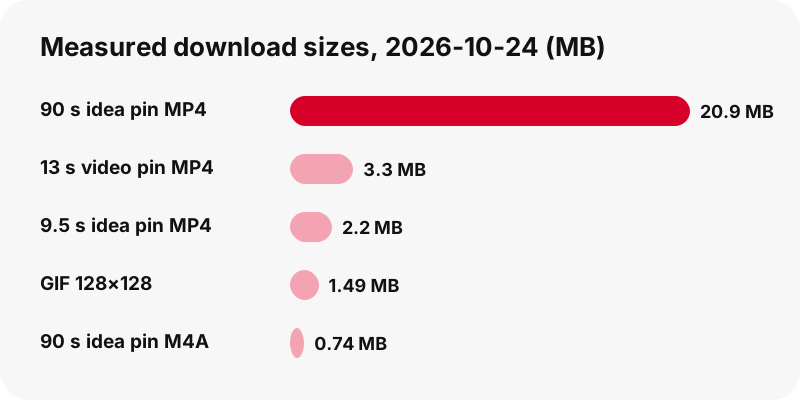
Sizes depend on length and motion, so the card shows the exact figure before you click. Idea pins also offer two lighter MP4s, about 486×864 and 360×640, which matter little on a Mac but help on a tethered phone connection.
The sound alone is far lighter: the M4A from a 9.5-second idea pin was 80 KB, against 2.2 MB for the video. See Pinterest to MP3 (M4A) for how it is cut.
Why is the best version 720p?
Because that is the top of what Pinterest stores. In our tests, an idea pin whose source was listed as 1080×1920 still had 720×1280 as its largest stream and MP4. On a large Mac display a vertical 720p clip looks fine at its natural size and soft when stretched to full screen.
Do not trust pages that promise 1080p or 4K from Pinterest: there is no such file to deliver, only an upscaled copy. The exception is the still cover frame, which the thumbnail downloader saves at full size. For the details, read Pinterest video quality explained.
Can you move clips between your Mac, iPhone and iPad?
Yes, through iCloud Drive. On iPhone, Apple's Safari settings guide says saving downloads to iCloud Drive lets you open the file on any iPhone, iPad or Mac signed in to the same Apple Account.
So a clip saved on the phone during the day can be waiting in iCloud Drive › Downloads in the Finder sidebar at night. The reverse works if you set Safari on the Mac to save into an iCloud Drive folder.
Device specifics: Pinterest videos on iPhone and Pinterest videos on iPad.
What if the Mac download does not start?
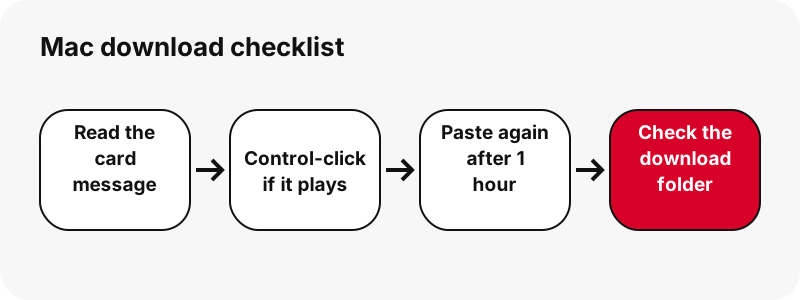
Look at the message on the card first. “Pin not found. It may be private, deleted, or the link is incomplete.” means the pin is not public or the address was cut short.
- Clip plays in a tab instead of saving: Control-click the button and choose Download Linked File.
- Button no longer works: links expire after one hour, so paste the pin address again.
- Paused download in Safari: open the downloads list and resume it, as Apple's guide shows.
- Damaged file: Apple suggests deleting it and downloading again.
- Private pin: it cannot be read; see private Pinterest videos.
Pinterest's sharing help shows the share icon if copying the address is awkward. More fixes: Pinterest video download not working.
Other Pinterest downloads on Mac
Saving pictures or GIFs instead? Use Pinterest images on Mac and Pinterest GIFs on Mac. A plain MP4 converter for any pin is on Pinterest to MP4.
Frequently asked questions
How do I download a Pinterest video on a MacBook?
Copy the pin address from pinterest.com, paste it into the box on this page, press Download and click the MP4 button. It lands in your Downloads folder.
Where do Pinterest videos go on Mac?
Into the folder your browser uses. In Safari that is set in Safari › Settings › General › File download location; Chrome's default is /Users/<username>/Downloads.
The video opened in a Safari tab. How do I save it?
Go back to the result card, Control-click the MP4 button and choose Download Linked File, as Apple's Safari guide describes.
Why did the download disappear from Safari's list?
Safari removes list entries after one day by default. The file itself stays in the download folder; change the timing in Safari › Settings › General.
Which app opens the MP4?
QuickTime Player: double-click the file in the Finder or use File › Open File.
How do I put the video in Photos on Mac?
In Photos choose File › Import, or drag the MP4 from the Finder onto the Photos window or its Dock icon.
Do I need a browser extension on Mac?
No. SaverPin is a web page; there is no extension, and none is needed in Safari or Chrome.
What is the best quality for Pinterest videos on Mac?
720p at most, because that is the largest MP4 Pinterest stores. Each button shows the exact pixel size; nothing is upscaled.
Can I save only the sound on Mac?
Yes. Your Mac's browser separates the AAC sound from the MP4 and saves it as .m4a, bit for bit, so QuickTime Player can play it. We never label it MP3, because it is not one.
How do I play a downloaded Pinterest GIF on Mac?
Select it in the Finder and press the Space bar: Apple says Quick Look plays animated GIFs, while Preview shows each frame as a still.
Is SaverPin part of Pinterest?
No. SaverPin is built and run independently, without any partnership with Pinterest, and it opens public pins only.
Can I use a downloaded Pinterest video in my own project?
Only with the creator's permission, unless the use is clearly your own personal viewing. Reposting someone else's video can infringe copyright; see is it legal to download Pinterest videos.
Guides
Video — Paste a pin link and save the video as MP4, up to 720p.
Sources
- Download items from the web in Safari on Mac — Apple
- Download a file (Chrome on desktop) — Google
- Open media files in QuickTime Player on Mac — Apple
- View animated GIFs in Preview on Mac — Apple
- Media formats supported by Apple apps — Apple
- Import from storage devices and DVDs in Photos on Mac — Apple
- Customize your Safari settings on iPhone — Apple
- Share Pins, boards and profiles to social networks — Pinterest