What does a Pinterest carousel saver do?
A Pinterest carousel saver takes a pin made of several swipeable slides and lists each slide as its own file, so you can download all images from a Pinterest carousel, or only the one you need, instead of being stuck with the first slide.
That first-slide problem is common. Long-pressing a carousel in the app or right-clicking it in a browser usually grabs the slide on screen, often as a resized preview. The rest of the set stays behind the swipe.
SaverPin reads the public data of the pin, finds every slide and checks every file. Picture slides arrive as the creator's original upload; video slides arrive as MP4 with their cover and first frame. Up to 20 slides are listed for one pin.
Carousels use the same multi-page mode as the Pinterest Reels downloader. For a single picture pin, the image downloader is the quicker page.
When is a Pinterest carousel saver worth using?
Whenever the useful part of a pin sits on slide three or seven. Carousels are built to be swiped, and a Pinterest carousel saver turns that sequence into files you can open without the app.
- Step-by-step cards: a tutorial where each slide is one step, kept offline for the workbench or kitchen.
- Product sets: several views of an item you are considering, saved to compare later.
- Mood boards: a palette or room idea split over slides, kept at full resolution for your own reference.
- Short video slides: a quick demo inside a carousel, kept as MP4 with its sound.
In every case you keep the creator's own file. Saving a pin to a board inside Pinterest only bookmarks it; if the pin goes, the bookmark goes with it.
What counts as a carousel pin on Pinterest?
A carousel is one pin that holds two or more slides people swipe through. Pinterest documents the format most clearly on its business pages, where carousels are a creative option for brands.
“Carousel ads feature multiple images for people to swipe through.”
The same spec page lists the limits creators work with: business accounts only, .PNG or .JPEG files of up to 20 MB each, an aspect ratio of 1:1 or 2:3, and 2 to 5 images per carousel (2 to 10 images and video for the sales objective). Carousels can also run unpaid, for organic reach.
| Carousel rule (Pinterest spec page) | Value | What it means for saving |
|---|---|---|
| Who can create one | Business accounts only | Carousels come from business profiles: brands, shops, publishers |
| Image formats | .PNG or .JPEG | Picture slides are saved in the format uploaded |
| Max size per image | 20 MB | Originals can be far larger than the feed preview |
| Aspect ratio | 1:1 or 2:3 | Square or tall slides, never wide |
| Slides per carousel | 2 to 5 images (2 to 10 for sales) | Well inside SaverPin's 20-slide ceiling |
Idea pins with several pages are a related but different format, made in the app and usually vertical. They have their own page: the Pinterest story saver.
Is uploading several pictures at once the same as a carousel?
No. When someone picks several images in Pinterest's regular desktop uploader, each image becomes its own separate pin. Pinterest's help page on creating pins says so directly:
“You can select up to 10 images. Each image will create a new Pin.”
So if a set of related pictures shows up as separate pins in a board, each has its own link and is saved one link at a time. If they belong to one board, the board downloader lists up to 50 of them in one go.
How do you download all images from a Pinterest carousel?
Paste the carousel's link, press Download, then tap the button of each slide in turn. Every slide sits in its own row, in the order the pin data lists them, so nothing is hidden behind a swipe.
- Copy the link of the carousel pin, not of the board it sits on.
- Paste it into the SaverPin box and press Download.
- Check the slide count on the card: it tells you how many parts the pin has.
- Tap the main button of slide 1, then slide 2, and so on.
- Rename the files with their slide number if the order matters to you.
There is one download per slide by design. Your browser may ask once whether this site may save several files; Google's Chrome help notes that "You can choose to allow sites you visit to download related files together" (Download a file).
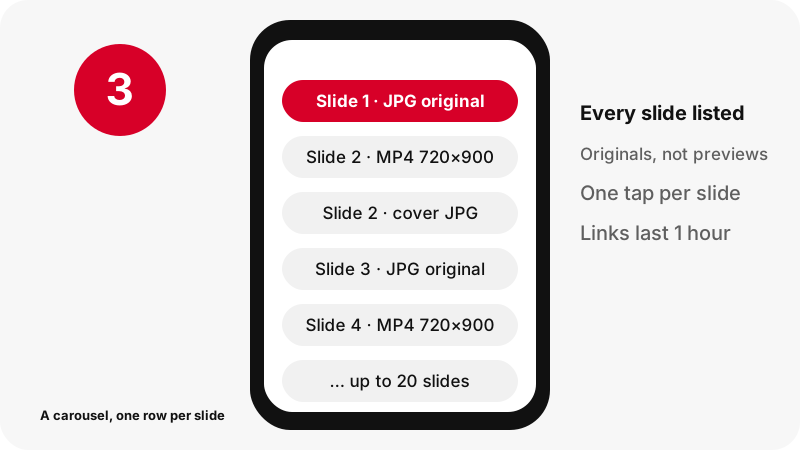
How does a Pinterest carousel saver find the slides behind the swipe?
It reads the pin's public record, which names every slide and the files Pinterest keeps for it. The swipe you see in the app is only a viewer; the slides are already listed in the data before you touch the screen.
For each picture slide, the Pinterest carousel saver asks for the originals copy and reads its true width, height and weight from the file header. For each video slide, it locates the MP4, plus the first frame and the cover, and checks them the same way.
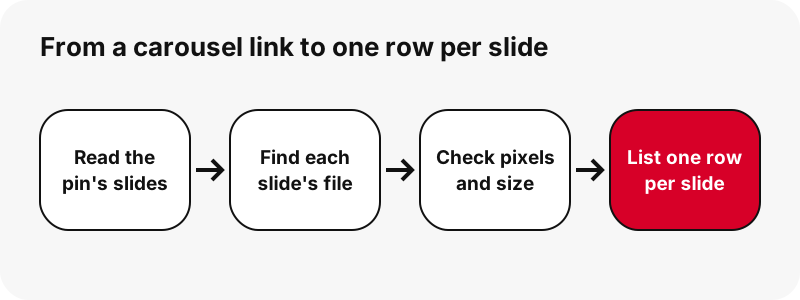
Files that fail the check never get a button. If a slide's file is missing on Pinterest's side, you see fewer buttons, not a broken download. That is also why the sizes on the card can be trusted: they come from the files, not from a label.
What file does each carousel slide give you?
Picture slides return the creator's original file, while video slides return an MP4 together with a thumbnail and a cover. The table uses a real 13-slide carousel we tested on 2026-10-24.
| Slide type | Buttons per slide | Measured in our 13-slide test | Format |
|---|---|---|---|
| Picture slide | Original image | 1365×1706, 171 to 263 KB each | As uploaded (JPG, PNG or WebP) |
| Video slide | MP4 | 720×900, 370 to 823 KB each (7 slides) | MP4 · H.264 video, AAC sound |
| Video slide | Thumbnail (first frame) | full size | JPG |
| Video slide | Cover image | as set by the creator | JPG |
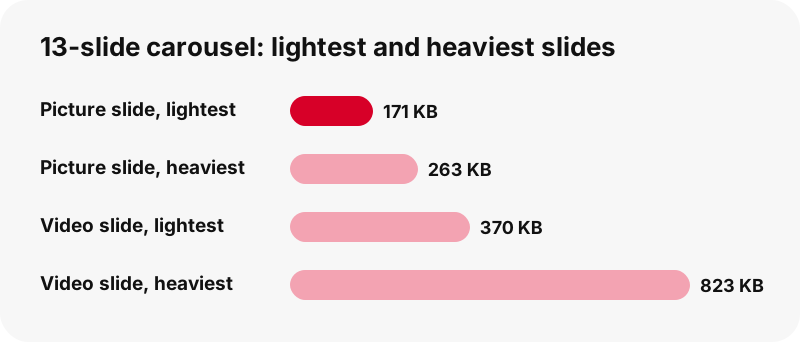
The video slides in our test were short, which is why each weighed under a megabyte. The Pinterest to MP4 page covers longer clips, and the thumbnail downloader covers covers and first frames.
Why save the original slide instead of the preview?
Because the preview in the feed is shrunk. In our tests a picture shown at 736 pixels wide had an original of 1365×1706, almost twice as wide. Text on a slide, such as a recipe card or a product chart, is only crisp in the original.
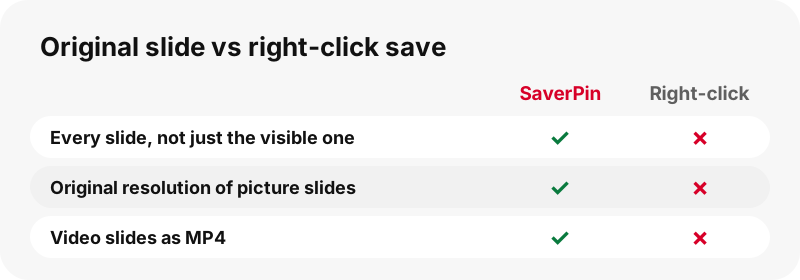
SaverPin requests the originals version Pinterest stores and leaves the format alone. A PNG slide stays PNG, so sharp edges and flat colors are not smeared by a second JPG compression (MDN's image format guide explains why lossy JPG suits photos better than charts). The image downloader page shows more side-by-side examples.
How many slides can the Pinterest carousel saver handle?
Up to 20 slides per pin. That covers every carousel format in Pinterest's specs, which top out at 10, with room to spare for idea pins that have many pages.
Speed is not an issue at that size. The 13-slide carousel above, mixing video and picture slides, was fully listed in about 1.8 seconds on our test machine; a single pin took around 1.1 to 1.5 seconds in a local test. Your connection and Pinterest's response time add to that.
Is there a ZIP of the whole carousel?
No. SaverPin does not pack slides into a ZIP. Each file is streamed from Pinterest's servers to you, untouched, and we do not store copies to bundle. In practice a carousel is 2 to 10 slides, so tapping each button takes seconds.
What if every slide is a picture, or every slide is a video?
Both work. If no slide contains video, the card adds a short note that the pin is a picture rather than a video, then lists the original image of every slide. If all slides are video, each gets its MP4 and stills.
- All pictures: one original image per slide; the video note is only information, nothing is missing.
- All videos: an MP4 per slide, plus thumbnail and cover; the card also names the largest video size it found.
- Mixed: each slide shows the buttons that fit its own type.
Want only the sound of a video slide? The Pinterest to MP3 tool cuts it to an .m4a file on your device. A GIF pin has its own page, the GIF downloader.
Why can't some carousels be saved?
Usually because the pin is not public. SaverPin opens pins the way a logged-out visitor would and never signs in, so anything behind an account stays out of reach.
| Situation | Result on the card |
|---|---|
| Public carousel pin | Every slide listed, up to 20 |
| Pin on a secret board | Pin not found: it is not public |
| Deleted or removed pin | Pin not found |
| Link to a profile or board section | Refused: paste one pin's link |
| Button older than one hour | Expired: paste the link again |
Pinterest explains who sees secret boards on its private boards page. Our troubleshooting guide covers network errors and other messages.
Where do saved carousel slides end up?
In the Downloads location of the browser you used. Moving them into Photos or a gallery is a separate step that depends on your device.
- iPhone and iPad: Safari keeps downloads in the Files app (see Apple's guide); the iPhone image guide shows how to move slides into Photos.
- Android: Chrome saves to the phone's download folder; see the Android image guide.
- Windows and Mac: the Downloads folder; the PC guide and Mac guide cover sorting.
- Any device: the download locations hub lists each browser's folder.
Tip for long sets: make a folder named after the pin before you start, and drop each slide into it as it lands. It keeps a 10-slide tutorial in one place.
Can you reuse slides from someone else's carousel?
Only with permission. Carousels are often product photos, infographics or tutorial cards made by a brand or creator, and those images are protected by copyright. Saving them for your own reference is different from publishing them.
Pinterest's copyright policy explains how owners report copies. Ask before reusing, credit the source, and see our guide to the legal side of saving pins for the general rules.
What happens to the slides after you save them?
Nothing on our side. Slides travel straight from Pinterest to you over a temporary link valid for sixty minutes; no copy is kept on SaverPin's side. No account, no Pinterest login and no watermark are involved; the privacy page lists what the server logs.
Which other SaverPin tools pair well with carousels?
For a story made of vertical pages, use the story saver. For many pins at once, the board downloader. And the Pinterest saver page sums up every format in one place.
Frequently asked questions
What is a Pinterest carousel saver?
A tool that lists each slide of a multi-slide pin as its own download. SaverPin does this for public pins, up to 20 slides, with the real size of each file shown first.
How do I save a Pinterest carousel on my phone?
Copy the pin link from the share menu, paste it into the box on this page, press Download and tap the button of each slide.
Can I download all images from a Pinterest carousel at once?
Every slide is listed at once, but each is a separate download. There is no ZIP; you tap one button per slide.
Why does right-click only save the first slide?
The browser saves whatever image is on screen, usually a resized preview of the visible slide. The saver reads all slides from the pin data instead.
Are carousel images saved in full resolution?
Yes. Picture slides come as the original upload. In our test the slides were 1365×1706, larger than the 736-pixel preview.
What format are the saved slides?
Picture slides keep the uploaded format (JPG, PNG or WebP). Video slides are MP4 with H.264 video and AAC sound, plus JPG stills.
How many slides can be saved from one pin?
Up to 20. Pinterest's own carousel specs allow 2 to 5 images, or up to 10 for sales campaigns.
Can I save video slides from a carousel?
Yes. Each video slide gets an MP4 button, a thumbnail and a cover. In our test the video slides were 720×900 and under 1 MB each.
Is a carousel the same as an idea pin?
No. A carousel is a set of swipeable slides, mostly from business accounts. An idea pin is a vertical, story-style pin made in the app. Both are listed page by page.
Will the slides keep their order?
The card lists them in the order the pin data gives. File names may not carry the slide number, so rename them if order matters.
Do I need to log in to Pinterest?
No. SaverPin never asks for your Pinterest login and only reads public pins.
Can I save a carousel from a secret board?
No. Pins that only open for signed-in or invited people cannot be read.
Why did a slide button stop working?
Download links expire after one hour. Paste the carousel link again for fresh buttons.
Does SaverPin add a watermark to the slides?
No. You receive Pinterest's stored file with nothing added.
Is SaverPin affiliated with Pinterest?
No. SaverPin is an independent tool, not affiliated with or endorsed by Pinterest, Inc.
Guides
Reels — Idea pins and multi-slide pins, one download per page.
Sources
- Pinterest product specs — Pinterest Business Help Center
- Create a Pin from an image or video — Pinterest Help Center
- Private boards — Pinterest Help Center
- Copyright — Pinterest Policy
- Download a file (Chrome desktop) — Google Chrome Help
- Find your downloads on iPhone or iPad — Apple Support
- Image file type and format guide — MDN Web Docs